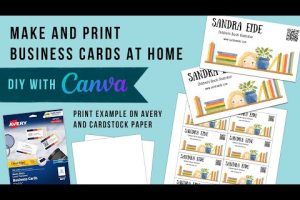
In today’s hyper-connected world, your first impression is often digital—but that doesn’t mean physical business cards have lost their power. Whether you’re a freelance designer, a small business owner, or a corporate executive stepping into a networking event, having a polished business card remains one of the most effective ways to exchange contact information and build credibility on the spot. The good news? You no longer need expensive design software or a professional graphic designer to create one. A business cards creator online free can help you craft stunning, print-ready cards in minutes without spending a single dollar. In this comprehensive guide, we’ll walk you through everything you need to know—from choosing the right free tool to designing a card that leaves a lasting impression.
Why Business Cards Still Matter in a Digital-First World
It’s easy to assume that digital contact sharing has made physical cards obsolete. Platforms like LinkedIn, NFC-enabled handshakes, and QR code exchanges are undeniably convenient. However, research consistently shows that people retain physical business cards at significantly higher rates than digital alternatives. A well-designed card sits on a desk, gets glanced at during a meeting, and serves as a tangible reminder of your brand long after a conversation ends.
A free business card maker online bridges the gap between professional design and accessibility. You don’t need to invest in Adobe Illustrator, pay for stock photos, or hire a freelancer. Instead, you get access to thousands of templates, drag-and-drop editors, and built-in typography options that rival premium design tools—all at zero cost.
Top Free Online Business Card Creators Compared

Not all free business card generators are created equal. Some offer superior templates, others excel in customization, and a few stand out for their export quality and ease of use. Here’s a detailed comparison of the most popular free online business card creators available today.
| Tool Name | Template Library | Customization Level | Export Formats | Watermark Free |
| Canva | 3,000+ business card templates | Very High | PNG, PDF, JPG | Yes (with free elements) |
| Adobe Express | 1,500+ templates | High | PNG, PDF | Yes |
| DesignEvo | 10,000+ templates | Medium-High | PNG, PDF | Limited free downloads |
| Vistaprint | 500+ templates | Medium | Yes (design only) | |
| Hatchful by Shopify | Customizable layouts | Medium | PNG, JPG, PDF | Yes |
| PosterMyWall | 2,000+ templates | High | PNG, PDF | Yes (with attribution) |
Canva remains the gold standard for anyone searching for a free business cards creator online. Its massive template library covers virtually every industry—from law firms and tech startups to fitness coaches and event planners. The drag-and-drop interface is intuitive enough for beginners yet powerful enough for intermediate users who want fine-grained control over spacing, color palettes, and font pairing.
Adobe Express offers a slightly more polished aesthetic, leaning into minimalist and modern design sensibilities. It integrates well with Adobe’s ecosystem, which is a bonus if you already use Photoshop or Illustrator. DesignEvo shines with its sheer volume of templates—over 10,000 options—but the free tier has some limitations on premium elements and downloads.
Quick Comparison: Best Picks by User Level
- Beginners: Canva or Hatchful — both feature guided design workflows and pre-sized business card layouts.
- Intermediate Users: Adobe Express or PosterMyWall — more advanced customization without overwhelming complexity.
- Advanced Designers: Vistaprint’s editor combined with Canva Pro features — maximum flexibility and professional-grade output.
How to Create a Professional Business Card Online for Free
Designing a business card for free doesn’t mean compromising on quality. Follow this step-by-step process to create a card that reflects your brand identity and works seamlessly in print.
- Choose Your Platform: Sign up for a free account on Canva, Adobe Express, or another tool from the comparison table above. Most platforms let you start designing immediately without a credit card.
- Select a Template: Browse the business card category and filter by industry, color scheme, or style. Pick a template that aligns with your personal brand or company identity.
- Customize the Content: Replace placeholder text with your name, job title, phone number, email address, website URL, and social media handles. Keep it concise—no more than six lines of text.
- Adjust Colors and Fonts: Ensure your card matches your existing brand guidelines. Use no more than two to three fonts and stick to a color palette of two to four colors for visual cohesion.
- Add a Logo or Image: Upload your company logo or a relevant image. Most free business card makers allow image uploads without quality loss.
- Review and Export: Double-check spelling, alignment, and contrast. Export your design as a high-resolution PDF or PNG file. For professional printing, always choose PDF with crop marks.
Pro Tip: Always set your design canvas to the standard business card size—3.5 inches by 2 inches in the US (88.9 mm × 50.8 mm). This ensures compatibility with commercial printers and avoids costly resizing issues.
Expert Tips for Designing Standout Business Cards
Creating a card that looks good on screen and translates well to print requires attention to detail. Here are expert-level recommendations that separate amateur designs from professional ones.

- Use Bleed and Safe Zones: When designing for print, extend your background color or images 0.125 inches beyond the trim edge. Keep all critical text at least 0.125 inches inside the border to prevent it from being cut off during printing.
- Choose Legible Fonts: Script fonts may look elegant, but they can be nearly impossible to read at a glance. Pair a clean sans-serif font for your name with a simple serif or sans-serif for details.
- Leverage White Space: Don’t overcrowd your card. White space improves readability and gives the design a premium, uncluttered feel.
- Add a QR Code: Many free online generators include built-in QR code tools. Link it to your LinkedIn profile, portfolio, or a digital business card page for a modern touch.
- Consider Double-Sided Design: A second side gives you extra real estate for a tagline, services list, or a memorable visual element without cluttering the front.
Free vs Paid Business Card Makers: What’s Worth Paying For?
Most free online business card creators let you download your design at high resolution without paying anything. So where do paid upgrades actually add value?
What You Get for Free: Full design access, thousands of templates, standard export formats (PNG, JPG, PDF), and basic customization tools. For most individuals and small businesses, the free tier is more than sufficient.
What You Might Pay For: Premium templates with exclusive graphics, priority customer support, bulk printing services, and advanced features like brand kit storage or team collaboration. If you’re printing hundreds or thousands of cards, services like Vistaprint or Moo offer free design tools combined with affordable bulk printing—but the design tools themselves are free regardless.
Expert Recommendation: Stick with free tools for design creation. Only consider paid printing if you need specialized paper stocks, embossing, foil stamping, or large volume orders. The quality gap between a free digital design and a paid one is often negligible when exported correctly.
Frequently Asked Questions
Yes, absolutely. Platforms like Canva, Adobe Express, and Hatchful allow you to design and download a business card at no cost. Some tools offer free designs with optional watermarks or premium elements, but you can always select free-tier assets to create a completely cost-free card. The only potential cost comes when you choose to print physical copies through a separate printing service.
What file format should I export my free business card design in?
For digital sharing, PNG offers the best balance of quality and file size. For professional printing, export as a high-resolution PDF (300 DPI) with bleed settings enabled. Avoid exporting as JPG for print jobs, as compression artifacts can cause visible quality loss, especially in solid-color backgrounds and fine text lines.
How do free online business card makers compare to hiring a professional designer?
For standard business cards with straightforward layouts, a free online creator produces results that are nearly indistinguishable from a professionally designed card. Professional designers become valuable when you need highly custom illustrations, complex brand systems, or cards with special finishing techniques. For 90% of use cases, a free business cards creator online free is more than adequate.
Can I create business cards for multiple people using a single free account?
Yes, most platforms allow unlimited designs per free account. You can create business cards for an entire team by making separate design files for each person. Some tools like Canva also offer team collaboration features on their free tier, letting multiple team members contribute to a single card design.
Do free business card generators support custom dimensions and rounded corners?
Most modern free business card makers support custom dimensions beyond the standard 3.5″ × 2″ size, including square cards, mini cards, and oversized formats. Rounded corner options are also widely available, though they may be labeled under “shape” or “style” settings within the template editor rather than as a separate feature.
Final Thoughts
The era of expensive design software and professional agencies as gatekeepers to quality business cards is over. Today, anyone with an internet connection can access a powerful business cards creator online free, produce a polished, print-ready design in under 15 minutes, and walk into their next meeting with confidence. The key is choosing the right platform, following design best practices, and focusing on clarity and brand consistency over flashy effects. Start experimenting with one of the free tools mentioned in this guide today—you might be surprised at how professional your card looks without spending a dime.