In today’s hyper-connected world, the traditional paper business card is evolving fast. If you have ever fumbled through a stack of crumpled cards at a networking event or watched a contact slip through the cracks after a handshake, you already understand why a business card online has become a game-changer. A digital business card is not just a trendy replacement for paper — it is a powerful networking tool that works 24/7, reaches farther, and leaves a lasting impression. Whether you are a freelancer building your personal brand, a small business owner scaling operations, or a corporate professional managing a large network, understanding how to leverage a business card online can transform the way you connect, share, and grow.
What Is a Business Card Online?
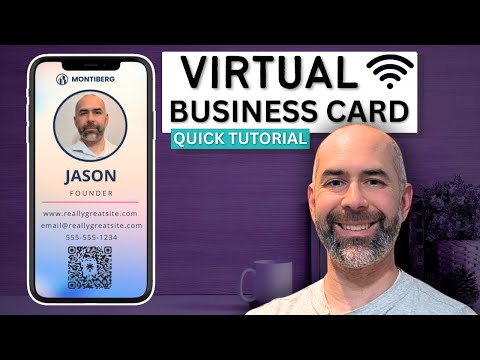
A business card online — also known as a digital business card, virtual business card, or electronic contact card — is a web-based or app-driven profile that replaces the traditional printed card. It typically includes your name, job title, company, phone number, email address, website, social media profiles, and sometimes a professional headshot or company logo. Unlike its paper counterpart, a digital business card can be shared instantly via a link, a QR code, NFC tap, or even through email and messaging apps.
The beauty of a business card online lies in its versatility. You can update your information in real time, track who viewed your card, and include dynamic content like portfolio links, calendar booking buttons, or even a short introductory video. This makes the digital format far more powerful than any piece of cardstock ever could be.
Why Digital Business Cards Are Replacing Paper
The shift from paper to digital is not just a preference — it is a practical response to how modern professionals work and connect. Here are the key reasons a business card online is rapidly becoming the standard:
- Instant sharing without physical contact: You can send your card with a single tap or link, eliminating the awkward exchange of paper cards.
- Always up to date: Change your phone number or add a new role? Update once, and every recipient sees the latest version.
- Eco-friendly and cost-effective: No printing costs, no wasted cards from outdated information.
- Rich media integration: Include clickable links to your LinkedIn, portfolio, YouTube channel, or online store.
- Analytics and tracking: Many platforms let you see who viewed your card, when, and from where — giving you valuable insights for follow-ups.
- Search engine visibility: A well-optimized digital card can appear in search results, making it easier for people to find you organically.
When you combine convenience, sustainability, and advanced features, the case for going digital becomes overwhelming. Professionals who adopt a virtual business card strategy often report faster follow-up rates and stronger first impressions.
Top Platforms for Creating a Business Card Online
Choosing the right platform is one of the most important decisions you will make. Not all digital business card tools are created equal, and the best choice depends on your goals, budget, and technical comfort level. Here is a closer look at some of the leading options:
Popl
Popl is a blockchain-backed digital business card platform that allows users to create rich, multimedia profiles. It supports NFC sharing, QR codes, and seamless integration with CRM tools. Popl is particularly popular among sales professionals and entrepreneurs who want to track engagement and maintain a persistent digital presence.
Blinq
Blinq focuses on simplicity and speed. Users create a profile, generate a QR code or short link, and share it immediately. Blinq integrates with LinkedIn and other social accounts, making it ideal for professionals who want a quick, no-fuss solution.
TapTag

TapTag emphasizes NFC technology, allowing users to share their business card online with a simple tap between phones. It is a great choice for tech-savvy professionals and those who attend frequent in-person networking events.
CamCard
CamCard has been around longer than most competitors and offers a robust scanning and digital card management system. It is well-suited for professionals who deal with large volumes of contacts and need powerful organization features.
LinkedIn Profile as a Digital Card
Many professionals skip dedicated platforms altogether and simply use their LinkedIn profile URL as their online business card. While it lacks some customization options, it offers unmatched credibility and a massive built-in network.
How to Design a Professional Online Business Card
Designing your business card online is straightforward, but doing it well requires attention to detail. Follow these steps to create a card that stands out:
- Choose a clean, professional template. Most platforms offer pre-designed layouts. Pick one that aligns with your brand identity — colors, fonts, and imagery should be consistent with your overall personal or company brand.
- Include essential contact information. Your name, title, company, email, phone number, and website are non-negotiable. Add your LinkedIn profile URL and any other relevant social handles.
- Add a professional photo or logo. A high-quality headshot builds trust. If you represent a brand, include your logo prominently.
- Integrate interactive elements. Add clickable links to your portfolio, calendar, or online store. If your platform supports it, embed a short video introduction.
- Generate your sharing method. Create a QR code, a short link, or set up NFC sharing depending on your preferred distribution method.
- Test before sharing. Make sure the link works, the QR code scans correctly, and all information displays properly on both desktop and mobile devices.
Pro tip: Keep your design minimal. A cluttered digital card is just as off-putting as a cluttered paper one. Focus on readability and visual hierarchy so that the most important information — your name and contact details — stands out immediately.
Traditional Business Cards vs. Online Business Cards
Understanding the differences between traditional and digital formats helps you make an informed decision about which approach fits your needs best.
| Feature | Traditional Paper Card | Online Business Card |
| Cost per card | $0.10 – $1.00+ per print run | Free to $20/month (most platforms) |
| Update capability | None — reprint required | Instant, real-time updates |
| Sharing speed | Physical handoff required | Instant via link, QR, or NFC |
| Storage | Physical wallet or drawer | Cloud-based, accessible anywhere |
| Media richness | Text and logo only | Links, videos, portfolios, calendar |
| Analytics | None | View tracking, engagement data |
| Environmental impact | High (paper waste) | Zero physical waste |
| First impression | Tactile, memorable | Modern, tech-forward |
While traditional cards still hold value in certain industries and cultures — particularly in regions where face-to-face business etiquette is deeply rooted — the advantages of a business card online are undeniable for most modern professionals. The ability to track engagement, update information instantly, and share rich media gives digital cards a clear edge in functionality.
Expert Tips for Maximizing Your Digital Business Card
Creating your card is only half the battle. Here are expert-level strategies to get the most out of your digital business card online:
- Place your link everywhere: Add your digital card URL to your email signature, social media bios, website footer, and even on your physical business cards as a QR code. The more places people can find it, the better.
- Customize for your audience: If you work in multiple industries or hold different roles, consider creating separate digital cards tailored to each audience. A developer and a sales lead may need different information highlighted.
- Leverage analytics: Regularly check which platforms drive the most views. If your LinkedIn QR code is scanned far more than your personal link, double down on LinkedIn networking.
- Keep it current: Set a monthly reminder to review and update your digital card. Outdated information undermines credibility just as quickly as a paper card with a wrong phone number.
- Combine physical and digital: Print a QR code on your traditional paper cards that links directly to your digital profile. This gives recipients the best of both worlds — a tangible keepsake and an interactive digital experience.
- Optimize for mobile: Over 60% of digital card views happen on mobile devices. Ensure your card loads quickly, looks clean on small screens, and has easily tappable phone numbers and email links.
Frequently Asked Questions About Business Cards Online
Q1: How do I create a business card online for free?
Most digital business card platforms offer free tiers that allow you to create a basic profile with your contact information, social links, and a QR code. Popl, Blinq, and Canva all have free options that are more than sufficient for personal use or small-scale networking.
Q2: Can I share my online business card via NFC?
Yes, many platforms like Popl and TapTag support NFC-enabled sharing. You simply tap your phone against another person’s device, and your digital card is transferred instantly. This is especially impressive at conferences, trade shows, and in-person networking events.
Q3: Will a digital business card look professional enough for corporate settings?
Absolutely. Modern digital business cards are designed with professionalism in mind. Platforms offer clean, minimalist templates that rival the appearance of premium printed cards. In many tech-forward and creative industries, a digital card is now the preferred format.
Q4: How is a business card online better than a PDF of my contact details?
A dedicated online business card platform offers interactive features, analytics, real-time updates, and a branded experience that a static PDF cannot match. You can track views, include clickable call-to-action buttons, and ensure your contact information is always formatted correctly across devices.
Q5: Do I still need paper business cards if I have an online version?
Not necessarily, but many professionals keep a small supply of printed cards with a QR code linking to their digital profile. This hybrid approach ensures you are prepared for any situation while still delivering the enhanced experience of a digital card.
Q6: Can a business card online improve my SEO or online visibility?
Yes, indirectly. When your digital card includes your website URL and is shared across platforms, it generates backlinks and referral traffic. A custom short link with your name can also rank in search engines, making it easier for people to discover your professional profile organically.
Final Thoughts
The way professionals exchange contact information is undergoing a fundamental shift, and a business card online sits at the center of that transformation. Digital business cards offer unmatched convenience, rich interactivity, and measurable engagement — advantages that paper cards simply cannot replicate. Whether you are just starting out or looking to modernize your existing networking strategy, creating a polished digital business card is one of the simplest yet most impactful steps you can take. The professionals who embrace this change today will be the ones who build stronger connections, close more deals, and stand out in an increasingly digital world.