In today’s hyper-connected professional landscape, the traditional paper business card is undergoing a remarkable transformation. More professionals are turning to business cards online as their primary networking tool, and the shift makes perfect sense when you consider the convenience, sustainability, and versatility that digital alternatives offer. Whether you are a freelancer building your personal brand, a sales executive closing deals across continents, or a small business owner trying to stand out in a crowded market, having a polished online business card can be the difference between a fleeting handshake and a lasting connection. This comprehensive guide walks you through everything you need to know about creating, optimizing, and leveraging digital business cards for maximum professional impact.

What Are Business Cards Online and Why They Matter
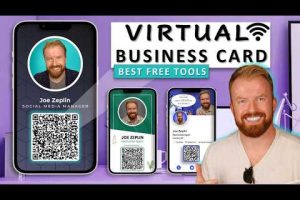
Online business cards, also known as digital business cards or virtual business cards, are electronic representations of your professional identity that live on the internet. Unlike their paper predecessors, these digital assets can be shared instantly via a link, a QR code, or through NFC technology. They typically include your name, title, company, phone number, email address, social media profiles, website URL, and sometimes even a brief bio or portfolio link. The beauty of online business cards lies in their ability to update in real time — when your phone number changes or you add a new role, you simply edit the profile, and every shared link reflects the latest information instantly.
From a search engine optimization perspective, platforms that host digital business cards can also index your professional data, improving your visibility in local search results and professional directories. This means your virtual business card doubles as a lightweight SEO asset, driving organic traffic back to your personal or company website.
Key Benefits of Using Business Cards Online
Switching from physical cards to digital alternatives offers advantages that go far beyond simple convenience. Let us break down the most compelling reasons professionals are making the switch.
Instant Sharing and Real-Time Updates
One of the most frustrating aspects of traditional paper cards is the lag between meeting someone and actually saving their contact information. With online business cards, you share a single link that automatically syncs to the recipient’s contacts. When your details change, you update once, and every previous share remains current. This eliminates the outdated contact problem that plagues physical cards for months or even years after an initial meeting.
Cost-Effective Branding and Professional Presence
Designing and printing physical cards can add up quickly, especially if you run a startup or need multiple versions for different campaigns. Digital alternatives eliminate printing costs entirely and allow you to A/B test different designs, layouts, and calls to action without spending a dime on reprints. Many online business card platforms also integrate analytics, giving you data on how often your card is viewed, shared, or clicked — insights that are simply impossible with paper.
Environmental Sustainability
Reducing paper waste is a growing priority for eco-conscious professionals. By adopting digital networking tools, you contribute to a more sustainable professional ecosystem while still maintaining a polished, memorable first impression.
Top Platforms for Creating Business Cards Online
The market for digital business card solutions has exploded in recent years, and choosing the right platform depends on your specific needs, budget, and technical comfort level. Here are some of the most reputable options available today.
- Blinq — A popular choice for professionals who want a sleek, minimalist design with instant contact syncing via NFC and QR codes.
- Popl — Known for its customizable templates and deep integration with LinkedIn and other social platforms, making it ideal for networking-heavy roles.
- Mobilo — Offers affordable plans with built-in analytics and the ability to create multiple cards for different audiences or campaigns.
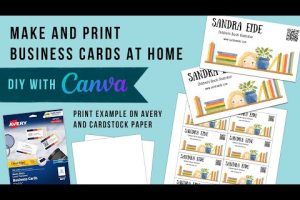
- Canva — While not exclusively a business card platform, Canva provides powerful design tools for creating visually stunning digital cards that you can host and share as links.
- VCF.me — A straightforward option focused on generating downloadable and shareable vCard files for seamless contact exchange.
How to Design a Professional Online Business Card

Creating an effective digital business card requires the same attention to detail as designing a physical one, but with additional opportunities for interactivity and multimedia integration.
Choosing the Right Layout
Start by selecting a layout that reflects your industry and personal brand. Creative professionals might opt for bold typography and expressive color schemes, while corporate users may prefer clean, minimal designs with subtle branding elements. Most platforms offer drag-and-drop editors, so you do not need any graphic design experience to produce a polished result.
Typography and Color Psychology
Your font choice and color palette communicate volumes before the recipient even reads your name. Sans-serif fonts like Inter, Poppins, or Montserrat tend to read well on screens, while navy, dark gray, and white backgrounds convey professionalism. Avoid cluttering your card with too many elements — prioritize readability and leave adequate white space to let your key information breathe.
Adding Interactive Elements
What sets business cards online apart from paper is the ability to embed interactive elements. Include clickable links to your LinkedIn profile, portfolio, calendar booking page, or even a short video introduction. These extras transform a simple contact exchange into a rich, memorable experience that keeps you top of mind.
Comparison: Traditional Business Cards vs Online Business Cards
The following table highlights the key differences between traditional and digital approaches to professional networking.
| Feature | Traditional Cards | Online Business Cards |
| Cost per card | $0.05–$0.50 each | Free to low monthly fee |
| Updating details | Re-print required | Instant update |
| Sharing speed | Physical handoff | Instant link or scan |
| Analytics tracking | Not available | Built-in views and clicks |
| Environmental impact | High paper usage | Zero waste |
| Multimedia support | Limited to text | Links, videos, media |
| Storage and organization | Physical collection | Cloud-synced and searchable |
Advanced Strategies for Maximizing Your Digital Business Card
If you have moved past the basics, it is time to explore advanced techniques that will take your online networking game to the next level.
- Optimize your card for local search. If you serve a specific geographic area, include your city and region in your card’s bio or tagline. This helps search engines associate your digital presence with local queries, increasing the chances that potential clients find you organically.
- Leverage QR code placement strategically. Print your QR code on relevant materials — your email signature, your website footer, presentation slides, and even your workspace signage. Every touchpoint becomes an opportunity for someone to access your digital card instantly.
- Integrate with your CRM. Many online business card platforms offer CRM integrations that automatically add new contacts to your sales pipeline. This eliminates manual data entry and ensures no networking opportunity slips through the cracks.
- A/B test your calls to action. Experiment with different prompts on your digital card — “Book a meeting,” “Download my guide,” “Follow me on LinkedIn” — and track which generates the most engagement. Use those insights to refine your networking strategy over time.
- Create multiple cards for different audiences. A freelancer might maintain separate cards for client outreach, collaboration inquiries, and media inquiries. Platforms like Popl and Mobilo make it easy to manage and switch between these profiles seamlessly.
Common Mistakes to Avoid When Using Online Business Cards

- Overloading your card with information. Resist the urge to include every single social media account, phone number, and office address. Keep it focused on the most relevant contact details for your primary audience.
- Neglecting mobile responsiveness. Most people will view your digital card on their smartphones, so ensure your layout looks clean and is easy to navigate on smaller screens.
- Forgetting to update links. A broken LinkedIn link or an outdated portfolio URL undermines credibility. Periodically audit all links on your digital card to make sure everything works perfectly.
- Ignoring analytics. If your platform provides view and click data, use it. Understanding when and how people interact with your card helps you refine your sharing strategy and identify the most productive networking channels.
Expert Tips for Getting the Most Out of Your Digital Business Card
Professional networking experts recommend treating your online business card as a living document rather than a one-time project. Review your card quarterly to ensure your information is current, your design aligns with your evolving brand, and your calls to action remain relevant. Pair your digital card with a brief, personalized follow-up message after sharing it — this combination of instant accessibility and human warmth dramatically increases conversion rates. Additionally, consider adding your digital card to your email signature, Slack profile, and website footer to create multiple touchpoints that naturally funnel people toward your networking link.
Frequently Asked Questions
What is the best platform for creating business cards online?
The best platform depends on your specific needs. Popl and Blinq are excellent for professionals who prioritize contact syncing and NFC functionality. Mobilo is ideal for those who want affordable plans with detailed analytics. Canva works well for design-conscious users who want full creative control over their layout and visual identity.
Are online business cards better than traditional paper cards?
For most modern professionals, yes. Online business cards offer real-time updates, instant sharing, built-in analytics, and environmental benefits that paper cards simply cannot match. However, some industries and cultures still value the tactile experience of a physical card, so having both options available can be a smart strategy.
Can I create a free online business card?
Absolutely. Several platforms, including Blinq and VCF.me, offer free tiers that allow you to create and share a basic digital card. Premium plans unlock advanced features like custom domains, analytics, and unlimited card variations.
The most effective methods include sending the link directly via email or messaging apps, displaying your QR code on screens or printed materials, and tapping NFC-enabled cards for contactless sharing. The key is to make the process effortless for the recipient.
Do online business cards help with SEO?
Yes, indirectly. Hosting your professional profile on reputable platforms can improve your online presence and search visibility. Including a link to your website on your digital card also drives referral traffic, which contributes positively to your overall SEO performance.
Can I track who views my online business card?
Many platforms, such as Mobilo and Popl, include analytics dashboards that track views, clicks, and contact saves. This data helps you understand which networking efforts are yielding the most engagement and allows you to follow up with the right people at the right time.
Conclusion
The transition from paper to digital is not just a trend — it is a fundamental shift in how professionals connect, share information, and build lasting relationships. Business cards online offer unparalleled convenience, powerful branding opportunities, and measurable results that physical cards simply cannot deliver. Whether you are just starting out or looking to elevate an existing networking strategy, investing in a well-designed digital business card is one of the highest-return professional moves you can make in 2024 and beyond. Choose the right platform, design with intention, share consistently, and watch your networking capabilities transform.